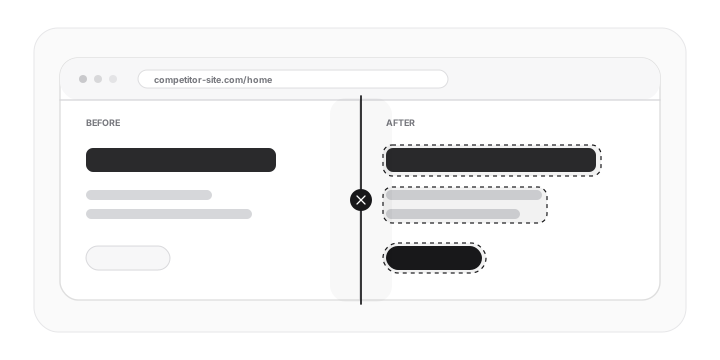
Before and after screenshots
The product workflow includes side-by-side screenshot comparison.
Feature
Use PixelWatch to compare before-and-after screenshots, see highlighted differences, and understand what changed on a monitored page.
Grounded in current product capabilities: monitored URLs, screenshots, visual diffs, alerts, and history.
The product workflow includes side-by-side screenshot comparison.
Changes can be reviewed with visual highlighting.
A visual diff helps you see what changed on a page, where it changed, and whether it deserves follow-up. PixelWatch is built around that review moment: add a URL, let the page be checked, then compare the latest full-page screenshot with the earlier page state.
PixelWatch starts from a monitored URL and captures a full-page screenshot during a daily check, so the review begins from the page state your team actually published or watched.
The latest screenshot can be reviewed side by side with the earlier screenshot, which makes layout, copy, CTA, and design changes easier to discuss.
Highlighted diffs help you move from a vague change signal to concrete visual evidence that a founder, agency, marketer, or QA owner can act on.
The diff is most useful when the monitored page, comparison point, and review owner are clear before changes appear.
Use one important, published URL per monitor. The cleaner the page choice, the easier it is to tell whether the diff represents a meaningful website change.
The earlier full-page screenshot is the baseline for the next comparison. It gives the new screenshot context instead of leaving reviewers to rely on memory.
Decide who reviews the visual diff before changes start arriving. A clear owner keeps expected edits, competitor updates, and client issues from blending together.
PixelWatch gives reviewers visual evidence they can scan quickly, then keep as context when the same page changes again.
Side-by-side screenshots show the earlier and latest page states without requiring someone to recreate the change manually.
The diff view draws attention to changed regions, which is useful when a long page has only one updated section or visual shift.
When the change needs more context, the website history timeline helps reviewers look back at earlier snapshots instead of treating one diff as the full story.
Visual diffs are strongest when the changed area connects to a page decision. These are common changes that deserve a closer look after a daily check.
Headlines, subheads, proof, and CTA copy can change the story visitors see first. These changes are worth reviewing on competitor pages, product pages, and launch pages.
Plan order, package names, comparison rows, visible pricing copy, and offer blocks deserve attention when the page supports sales, positioning, or market review.
A moved form, shifted proof section, missing image, or unexpected whitespace can change how the page reads even when the underlying copy is mostly the same.
Navigation changes, button placement, and signup path changes are useful to inspect because they affect how a visitor moves through the page.
Full-page screenshots help reviewers catch changes in FAQs, feature grids, comparison tables, footers, and other sections that are easy to miss manually.
The same visual diff workflow supports both external monitoring and internal page quality checks.
Use a visual diff after a Webflow, Bubble, or other no-code client page changes. It helps the team confirm whether the visible page still matches the intended handoff state.
Use screenshot comparison when a competitor updates a pricing page, homepage, product page, or landing page and you need to understand what changed.
Use diffs after a high-value page is edited, especially when the team wants a quick way to see whether key content, proof, or calls to action moved.
Use the diff as a shared record between product, marketing, founder, and agency stakeholders when a page change deserves discussion.
The review workflow should turn screenshot evidence into a decision. Start broad, then use the highlighted areas and history to decide what deserves action.
Start with the monitored URL and the latest full-page screenshot so the review is tied to the page state PixelWatch captured.
Use the side-by-side view to understand the earlier screenshot and the newer screenshot before focusing only on highlighted regions.
Connect the diff to the page purpose: competitor monitoring, client QA, campaign review, or product-page ownership.
When one comparison is not enough, look at earlier snapshots so the change is reviewed as part of the page history.
A visual diff is an attention tool, not a rule that every pixel movement matters. Define what the reviewer should care about before the page starts changing.
Prioritize changes to headlines, pricing presentation, CTAs, forms, navigation, proof sections, product claims, and important client-page areas.
Treat small rotating modules, date text, temporary banners, animation states, and known page churn as lower priority unless they affect the page owner or visitor experience.
A diff deserves follow-up when it affects a page with a named owner, an active campaign, a client handoff, or a competitor intelligence question.
Visual diff review is the right page when the reader needs to inspect a specific before-and-after change. Use these boundaries to route adjacent jobs cleanly.
A published URL has a baseline screenshot and someone needs to inspect what visibly changed during daily monitoring.
The main job is knowing that a watched page changed before a reviewer opens the screenshot comparison.
The main job is understanding when a change appeared or how a page evolved across more than one comparison.
The required check belongs inside a code release gate or the team only needs to compare two standalone image files.
Use visual diffs to review client pages after edits, launches, or platform changes.
Use screenshot comparison when a competitor changes design, messaging, or page structure.
The goal is a short, evidence-based review. These mistakes usually turn useful screenshot comparison into extra noise.
A diff is easier to act on when a founder, marketer, agency lead, or QA owner knows why the URL is monitored.
Highlighted areas show where to look. The reviewer still needs to decide whether the change affects a visitor, client, or market decision.
A narrow change can matter more or less depending on nearby content, page order, and whether the affected section supports a key action.
When a change looks surprising, review earlier snapshots before treating one before-and-after comparison as the whole story.
These answers keep the feature grounded in the actual PixelWatch workflow: monitored URLs, daily checks, screenshots, diffs, alerts, and history.
Start with a monitored URL and an earlier full-page screenshot. Daily checks can then compare the latest screenshot with the previous page state.
PixelWatch is built around full-page screenshots, so reviewers can inspect changes beyond the first viewport when important sections sit lower on the page.
Use the highlights as a guide, compare the before-and-after screenshots, then decide whether the change is expected, low priority, or worth follow-up.
No. PixelWatch fits ongoing review of published URLs. A CI-first visual testing workflow is still the better fit when screenshots must approve a code release before it ships.
Use the visual diff page when you need to inspect what changed. Use these related pages when the next question is notification, history, or choosing the first URLs.
Use alerts when someone needs to know that a monitored page changed before they open the diff.
Use history when one before-and-after comparison is not enough and the team needs to see how a page evolved.
Use the guide when a reader needs to understand screenshot comparison before choosing a workflow.
Use the explainer when a reader needs the full URL, screenshot, diff, alert, and history loop.
Use the checklist when an agency or QA owner needs a copyable review table for published-page diffs.
Continue with the pages that naturally support this workflow.
Add a URL, let PixelWatch check it daily, and review the visual history when something changes.
Featured on